
Understand your connection.
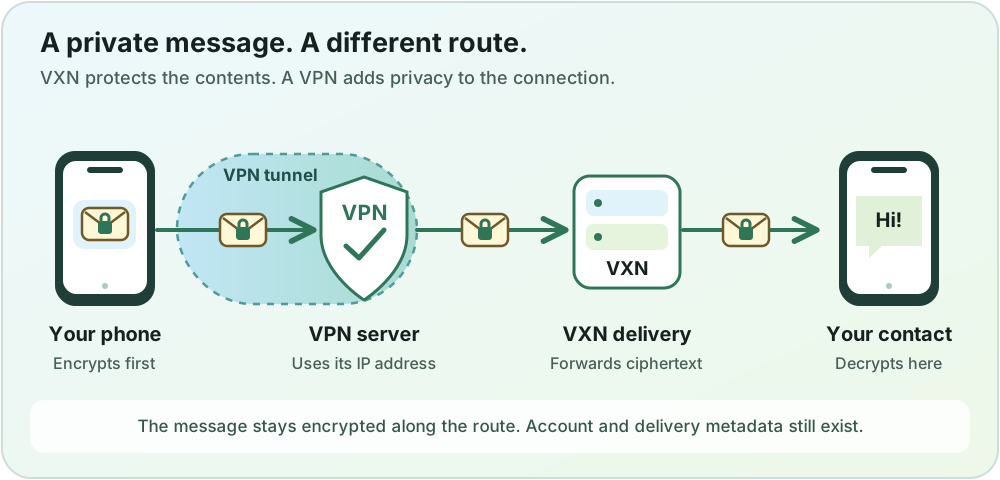
VXN works without a VPN. As an optional privacy tip, a VPN or Tor can help hide your usual IP address from the delivery service when configured to carry VXN traffic. Your message content is encrypted whether or not you use either option.
Direct connection Simple and fast
- What VXN sees
- Your home or mobile network’s public IP address, along with the account and delivery information needed to run the service.
- Pros
- No extra app, subscription or provider to manage.
- Fewer connection steps, which can make everyday messaging simpler and easier to troubleshoot.
- VXN’s message encryption still applies. A VPN is not required for end-to-end encryption.
- Cons
- The service can associate your connection with your usual network address.
- Your internet provider or local network may observe connection destinations and timing, even though HTTPS and message encryption protect content.
- Network restrictions can prevent access to the service.
- When it fits
- A straightforward choice when hiding your network address from the service is not your priority. Keep the device and app updated.
Reputable VPN Everyday IP separation
- What changes when using a VPN?
- When VXN traffic passes through the VPN, the service sees the VPN server’s public IP address. Your internet provider sees a connection to the VPN.
- Pros
- Separates your usual network address from the connection VXN receives.
- Can reduce destination information exposed to an unfamiliar Wi-Fi network.
- Often practical for daily use once configured.
- Cons
- You trust another provider with connection information. Review its ownership, logging policy and independent assessments.
- Speed, reliability and cost vary. Some networks block VPN connections.
- VXN still recognizes your account and delivery activity. A VPN does not make that anonymous or replace message encryption.
- Before you connect
- Check that VXN is included in the VPN’s protected apps. If the VPN offers connection blocking when disconnected, understand and test that setting. A browser-only extension does not cover the Android app. Avoid promises of total anonymity.
- Read more
- EFF: choosing a VPN
Tor Routing through several relays
- What VXN sees
- For traffic correctly routed through Tor to the public service, VXN sees a Tor exit address. Your account and delivery metadata remain visible to VXN.
- Pros
- Routes traffic through several relays to separate your source address from the destination.
- Distributes the connection across a network rather than relying on one VPN provider.
- Cons
- The extra route can be slower, and some services restrict Tor connections.
- Only apps configured to use Tor are covered. Running Tor Browser alone does not protect other app traffic.
- Account identification and traffic-correlation risks remain; routing alone cannot guarantee anonymity.
- Before you connect
- Confirm that your setup routes the VXN app through Tor. This guide does not establish that VXN has been tested with a particular Tor configuration. Keep HTTPS enabled.
- Read more
- Tor Project: safe use · Why Tor can be slower
Check how your app connects
The comparison describes traffic that actually passes through the chosen network path. Opening this website in Tor Browser does not route the VXN Android app through Tor. Check your network setup before relying on it.
For the information VXN collects, how long it is kept and how to delete an account, read the privacy notice. For message encryption, read the technical notes.